What Do 300 Mbps, 500 Mbps, 1 Gig, 2 Gig, and 5 Gig Internet Speeds Actually Mean?
Internet providers often advertise plans with speeds like 300 Mbps, 500 Mbps, 1 Gbps, 2 Gbps, or even 5 Gbps. These numbers can sound impressive, but for many everyday internet users, they do not immediately explain what the connection can actually do.
For example, is 300 Mbps enough for streaming and working from home? Is 1 Gig internet necessary for a family with several connected devices? And who really needs a 2 Gig or 5 Gig fiber internet plan?
The answer depends on how your household uses the internet. A person who mainly browses websites, streams movies, and joins video calls has different needs than a household with multiple gamers, remote workers, smart TVs, cloud backups, and large file downloads happening at the same time.
This guide explains what common fiber internet speeds mean in real life. We will look at popular fiber speed tiers, including 300 Mbps, 500 Mbps, 1 Gbps, 2 Gbps, and 5 Gbps, and show examples of what each speed can handle. We will also compare estimated download and upload times, so it is easier to understand the practical difference between these plans.
Because fiber internet is often different from cable internet, we will also explain why symmetrical upload and download speeds matter. This is one of the biggest advantages of fiber, especially for people who work from home, upload large files, use cloud storage, make video calls, or share content online.
Understanding Fiber Internet Speeds
Before comparing specific fiber plans, it helps to understand what internet speed numbers actually measure. Internet speed is usually shown in Mbps or Gbps, and those numbers describe how much data your connection can move each second.
Mbps means megabits per second. Gbps means gigabits per second. Since 1 Gbps equals 1,000 Mbps, a 1 Gig fiber plan is another way of saying a 1,000 Mbps plan.
This can get confusing because internet speeds are usually measured in bits, while file sizes are usually measured in bytes. A simple way to estimate file transfer speed is to divide the internet speed by 8.
For example:
A 300 Mbps connection can move up to about 37.5 megabytes per second under ideal conditions.
A 500 Mbps connection can move up to about 62.5 megabytes per second under ideal conditions.
A 1 Gbps connection can move up to about 125 megabytes per second under ideal conditions.
These are best-case estimates, not guaranteed results every time. Your real-world speed can depend on your router, Wi-Fi signal, device, network traffic, and the server or website you are using.
Download Speed vs. Upload Speed
When most people think about internet speed, they usually think about download speed. This is the speed used when you stream a movie, load a website, download a game, install an update, or watch videos online.
Upload speed works in the other direction. It matters when you send data from your device to the internet. This includes video calls, cloud backups, uploading photos and videos, sending large work files, online classes, security camera uploads, and live streaming.
For everyday internet use, both speeds matter. Download speed affects how quickly you receive content. Upload speed affects how quickly and smoothly you send content.
This is one reason fiber internet can feel different from many cable internet plans. Fiber connections often offer strong upload speeds, and many fiber plans are symmetrical, meaning the download and upload speeds are the same or very close. That can make a big difference for remote work, content creation, cloud storage, and homes with many connected devices.
Quick Comparison Table: What Each Fiber Speed Can Do
The easiest way to understand fiber internet speed is to look at what each plan can do in everyday situations. A faster plan can download large files more quickly, support more devices at the same time, and make upload-heavy tasks feel much smoother.
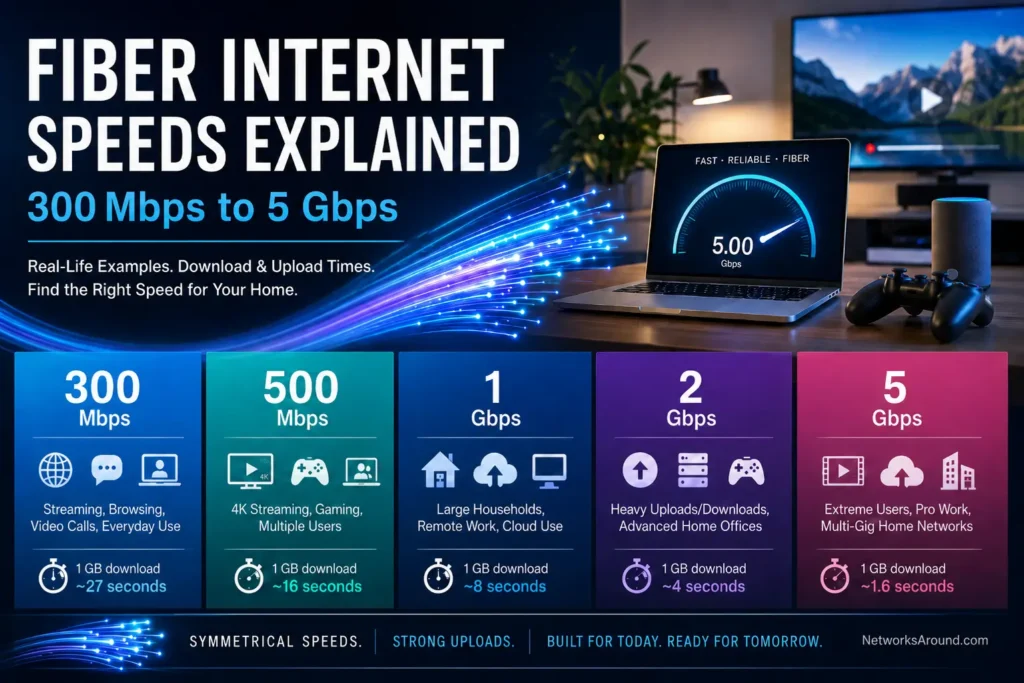
The table below compares common fiber internet speeds, including 300 Mbps, 500 Mbps, 1 Gbps, 2 Gbps, and 5 Gbps. The download and upload time estimates are based on ideal conditions, so real-world results may be slower depending on your Wi-Fi, router, device, network traffic, and the service you are connecting to.
| Fiber Speed | Approx. Max Transfer Rate | 1 GB File | 10 GB File | 50 GB File | Best For |
|---|---|---|---|---|---|
| 300 Mbps | ~37.5 MB/s | ~27 seconds | ~4.5 minutes | ~22 minutes | Everyday browsing, streaming, video calls, remote work, smaller households |
| 500 Mbps | ~62.5 MB/s | ~16 seconds | ~2.7 minutes | ~13 minutes | Busy homes, 4K streaming, gaming, frequent downloads, multiple users |
| 1 Gbps | ~125 MB/s | ~8 seconds | ~1.3 minutes | ~6.7 minutes | Large households, gamers, content creators, heavy cloud storage use |
| 2 Gbps | ~250 MB/s | ~4 seconds | ~40 seconds | ~3.3 minutes | Very active homes, large uploads/downloads, advanced home offices |
| 5 Gbps | ~625 MB/s | ~1.6 seconds | ~16 seconds | ~1.3 minutes | Extreme users, professional file transfers, multi-gig home networks |
These examples are useful for comparing the speed tiers, but they should be treated as estimates. In a real home, a single device may not always reach the full speed of the plan, especially over Wi-Fi. For example, a phone or laptop connected far from the router may get much lower speeds than a computer connected directly with Ethernet.
It is also important to remember that speed is not only about one download finishing faster. A higher-speed fiber plan also gives your home more total capacity. That means several people can stream, work, game, upload files, and use smart devices at the same time with less slowdown.
For many households, 300 Mbps or 500 Mbps fiber internet is already enough for regular daily use. 1 Gig fiber internet is a strong option for larger households or heavier users. 2 Gig and 5 Gig fiber plans are more specialized and usually make the most sense for people who transfer large files often, have many active users, or already use advanced networking equipment.
For readers comparing actual fiber internet options, it may also help to review provider-specific plans from AT&T Fiber, Frontier Fiber Internet, Kinetic Fiber Internet, and Verizon Fiber Internet. Each provider may offer different speed tiers, availability, pricing, equipment options, and upload/download speed details, so checking the plans available in your area is the best way to match these speed examples with real service options.
What Can You Do With 300 Mbps Fiber Internet?
A 300 Mbps fiber internet plan is a strong starting point for many everyday households. It may not sound as impressive as 1 Gig or multi-gig internet, but 300 Mbps is still fast enough for a wide range of common online activities.
With 300 Mbps fiber, you can comfortably browse websites, check email, stream music, watch HD or 4K video, join video calls, play online games, and use several smart devices around the home. For many smaller households, this speed tier provides more than enough performance for normal daily use.
A 300 Mbps connection can also support multiple people online at the same time. For example, one person could be watching a 4K movie, another could be on a video call, and someone else could be browsing or playing an online game without the connection feeling overloaded.
For downloads, 300 Mbps can still be quick. Under ideal conditions, a 1 GB file could download in about 27 seconds. A 10 GB file, such as a large software update or a group of videos, could take about 4 to 5 minutes. A 50 GB file, such as a large game download, could take around 22 minutes.
The upload side is where fiber can make this speed tier feel even better. If the 300 Mbps plan is symmetrical, you could also upload a 1 GB file in about 27 seconds under ideal conditions. A 10 GB folder of photos, videos, or work files could upload in about 4 to 5 minutes.
That is useful for people who work from home, use cloud storage, send large attachments, back up photos, or join video meetings. Even if 300 Mbps is not the fastest fiber plan available, symmetrical upload speed can make it feel much more capable than a cable plan with a similar download speed but much lower upload speed.
Best Uses for 300 Mbps Fiber
A 300 Mbps fiber plan is a good fit for:
Small to medium households, everyday browsing, streaming, remote work, video calls, online school, smart TVs, phones, tablets, laptops, and casual gaming.
It is also a practical option for users who want reliable internet but do not download huge files every day. If your household mainly streams, browses, works online, and uses a normal number of connected devices, 300 Mbps fiber may be enough.
When 300 Mbps May Not Be Enough
A 300 Mbps plan can start to feel limited when many heavy activities happen at the same time. For example, the connection may feel busier if several people are streaming in 4K, downloading large games, backing up files to the cloud, and joining video calls at once.
It may also feel slower for users who frequently download or upload very large files. In that case, 500 Mbps or 1 Gig fiber may provide a better experience.
What Can You Do With 500 Mbps Fiber Internet?
A 500 Mbps fiber internet plan gives your household more breathing room than 300 Mbps. It is still not as fast as gigabit internet, but for many homes, 500 Mbps is a comfortable middle ground between everyday performance and high-speed convenience.
With 500 Mbps fiber, multiple people can stream, work, browse, game, and use smart devices at the same time. This speed tier is especially useful for families, shared homes, or users who want faster downloads without necessarily paying for a full gigabit plan.
In everyday use, 500 Mbps can handle several common activities at once. One person could stream a 4K movie, another could be on a video meeting, someone else could be gaming online, and another person could be downloading files or browsing social media. The connection should still have enough capacity for normal use, assuming the Wi-Fi setup is strong.
For downloads, 500 Mbps can make larger files feel much quicker. Under ideal conditions, a 1 GB file could download in about 16 seconds. A 10 GB file could download in about 2 to 3 minutes. A 50 GB file, such as a large game or media project, could take about 13 minutes.
Upload performance can be just as important. If the plan is symmetrical, 500 Mbps upload speed means a 1 GB file could upload in about 16 seconds, while a 10 GB file could upload in about 2 to 3 minutes under ideal conditions.
This can be a major advantage for people who use cloud storage, upload videos, send large work files, or back up photos and documents. Compared with many cable internet plans, the upload difference can be very noticeable.
Best Uses for 500 Mbps Fiber
A 500 Mbps fiber plan is a good fit for:
Families, shared households, 4K streaming, video calls, online gaming, frequent downloads, remote work, online learning, and homes with many connected devices.
It is also a good choice for users who want a plan that feels fast today but still has some extra room for future needs.
Why 500 Mbps Is Often a Comfortable Choice
For many households, 500 Mbps hits a practical balance. It is faster than a basic plan, but not as advanced or expensive as multi-gig service. It gives users enough speed for demanding daily activities without being excessive.
A 500 Mbps fiber plan can be especially appealing when the upload speed is also 500 Mbps. That makes it useful not only for watching and downloading, but also for sending, sharing, backing up, and creating content online.
What Can You Do With 1 Gig Fiber Internet?
A 1 Gig fiber internet plan is one of the most popular high-speed options for households that want strong performance. Since 1 Gig equals 1,000 Mbps, this speed tier offers more than three times the capacity of a 300 Mbps plan and twice the capacity of a 500 Mbps plan.
For many homes, 1 Gig fiber is more than enough. It can support large households, multiple 4K streams, online gaming, video calls, cloud backups, large downloads, smart home devices, and remote work at the same time.
The biggest benefit of 1 Gig internet is not just that one file downloads faster. The real advantage is that many people and devices can use the connection at once with less chance of slowdown. This matters in households where several users are online throughout the day.
For downloads, 1 Gig fiber can be very fast. Under ideal conditions, a 1 GB file could download in about 8 seconds. A 10 GB file could download in about 1 to 2 minutes. A 50 GB file, such as a large game download, could take about 6 to 7 minutes.
If the connection is symmetrical, the upload side can be just as impressive. A 1 GB file could upload in about 8 seconds. A 10 GB video project or work folder could upload in about 1 to 2 minutes. A 50 GB cloud backup could upload in about 6 to 7 minutes under ideal conditions.
This makes 1 Gig fiber especially useful for content creators, remote workers, students, photographers, designers, software users, and anyone who frequently sends or backs up large files.
Best Uses for 1 Gig Fiber
A 1 Gig fiber plan is a good fit for:
Large households, gamers, frequent streamers, remote workers, content creators, cloud storage users, smart homes, and users who download or upload large files often.
It can also be a good option for households that want extra capacity, even if they do not use the full speed every day.
Why You May Not Always See 1 Gig on Every Device
Even if you have a 1 Gig fiber plan, every device in your home may not show 1,000 Mbps during a speed test. That does not always mean something is wrong with the internet connection.
Real-world speed can be affected by your router, Wi-Fi signal, device hardware, distance from the router, Ethernet port limits, background apps, and the website or server you are using. A wired Ethernet connection often comes closer to the plan speed than Wi-Fi.
For example, a newer computer connected directly to the router may show much higher speeds than an older phone connected over Wi-Fi in another room.
Is 1 Gig Fiber Worth It?
For many users, 1 Gig fiber is worth considering if the household has several active users or regularly handles large downloads and uploads. However, a smaller household that mostly streams, browses, and joins video calls may be perfectly fine with 300 Mbps or 500 Mbps.
The best reason to choose 1 Gig is capacity. It helps keep the whole household running smoothly, especially when several demanding activities happen at the same time.
What Can You Do With 2 Gig Fiber Internet?
A 2 Gig fiber internet plan is a multi-gig connection that offers twice the speed of 1 Gig internet. This is a very fast plan, but it is also more specialized. Not every household needs 2 Gig service, and not every device can fully use it.
With 2 Gig fiber, the main benefit is very high total capacity. This can help homes where many people are streaming, gaming, downloading, uploading, working, and using connected devices at the same time. It can also be useful for advanced home offices or users who regularly move large files.
For downloads, 2 Gig fiber can be extremely quick under ideal conditions. A 1 GB file could download in about 4 seconds. A 10 GB file could download in about 40 seconds. A 50 GB file could download in about 3 to 4 minutes.
If the plan is symmetrical, upload speeds can be just as powerful. A 1 GB file could upload in about 4 seconds. A 10 GB file could upload in about 40 seconds. A 50 GB backup or video project could upload in about 3 to 4 minutes under ideal conditions.
This is where 2 Gig fiber can make a noticeable difference for users who work with large files every day. For example, someone who uploads large video projects, design files, software builds, or cloud backups may save time compared with a slower plan.
Best Uses for 2 Gig Fiber
A 2 Gig fiber plan is a good fit for:
Very active households, advanced home offices, content creators, users who upload large files, heavy cloud storage users, multi-user gaming and streaming households, and homes with many connected devices.
It may also make sense for users who want a high-performance home network and already have equipment that can support multi-gig speeds.
Equipment Matters With 2 Gig Internet
To get the full benefit of 2 Gig fiber, your home network needs to support speeds above 1 Gig. This may require a multi-gig router, 2.5 Gbps Ethernet ports, compatible network adapters, and newer Wi-Fi equipment.
Without the right equipment, you may still get excellent performance, but individual devices may not reach the full 2 Gbps speed. For example, a computer with a standard 1 Gig Ethernet port cannot use more than about 1 Gbps on that wired connection. Some Wi-Fi devices may also be limited by their hardware or signal quality.
That means 2 Gig internet is not only about the plan. It is also about whether your router, cables, ports, and devices can take advantage of the extra speed.
Is 2 Gig Fiber Worth It?
For everyday browsing, streaming, and video calls, 2 Gig is usually more than necessary. However, for heavy households or users who frequently move large files, it can be useful.
The value of 2 Gig fiber is strongest when several people need high performance at the same time, or when large uploads and downloads are part of daily work.
What Can You Do With 5 Gig Fiber Internet?
A 5 Gig fiber internet plan is an extremely fast residential internet option. It is far beyond what most everyday households need, but it can be valuable for users with very demanding internet habits or advanced home network setups.
With 5 Gig fiber, the connection has a huge amount of total capacity. This can support many users, many devices, large downloads, large uploads, 4K or 8K streaming, remote work, online gaming, smart home devices, and cloud-based workflows all at the same time.
For downloads, 5 Gig fiber can be incredibly fast under ideal conditions. A 1 GB file could download in about 1 to 2 seconds. A 10 GB file could download in about 16 seconds. A 50 GB file could download in about 1 to 2 minutes.
If the connection is symmetrical, uploads can be just as fast. A 1 GB file could upload in about 1 to 2 seconds. A 10 GB video project could upload in about 16 seconds. A 50 GB backup could upload in about 1 to 2 minutes under ideal conditions.
This kind of speed can be helpful for people who regularly work with very large files. Examples include video production, photography, design, software development, large data transfers, cloud backups, and home-based business use.
Best Uses for 5 Gig Fiber
A 5 Gig fiber plan is a good fit for:
Professional creators, home-based businesses, advanced home offices, very large households, heavy cloud users, users with multi-gig wired networks, and people who frequently upload or download very large files.
It can also be useful for households that want maximum available capacity, even if most individual devices will not use the full speed on their own.
Most Devices Will Not Use the Full 5 Gig Speed
One important thing to understand is that a 5 Gig plan does not mean every device in the home will suddenly get 5 Gbps over Wi-Fi. Many phones, laptops, tablets, TVs, and game consoles cannot reach that speed individually.
To take full advantage of 5 Gig fiber, a home may need advanced networking equipment, including a multi-gig router, fast Ethernet ports, compatible network adapters, and high-quality cabling. Even then, the biggest benefit may be shared capacity across the whole home rather than one device using the entire connection.
For example, one wired computer might get very fast speeds, while phones and laptops on Wi-Fi may get lower speeds depending on signal strength and device limits.
Is 5 Gig Fiber Worth It?
For most everyday users, 5 Gig fiber is more speed than necessary. Streaming, browsing, video calls, and gaming do not usually require anything close to 5 Gbps on a single device.
However, 5 Gig can make sense for users who regularly transfer huge files, operate a demanding home office, run many connected devices, or want a premium home network. It is a high-end option for people who know they can benefit from the extra capacity.
Fiber vs. Cable Internet: Why Upload Speed Matters
When comparing internet plans, many people focus almost entirely on download speed. That makes sense because download speed affects some of the most common online activities, including streaming, browsing, downloading files, watching videos, and installing updates.
However, upload speed is also important, especially as more people work from home, use cloud storage, join video calls, upload photos and videos, and rely on connected devices throughout the day.
This is one of the biggest differences between many fiber and cable internet plans.
Fiber internet plans are often symmetrical, which means the download and upload speeds are the same or very close. For example, a fiber plan may offer:
- 300 Mbps download and 300 Mbps upload
- 500 Mbps download and 500 Mbps upload
- 1 Gbps download and 1 Gbps upload
Cable internet plans are often asymmetrical, which means the download speed is much faster than the upload speed. For example, a cable plan may advertise a high download speed, but the upload speed may be much lower.
A cable plan may look something like:
- 500 Mbps download and 20 Mbps upload
- 1 Gbps download and 35 Mbps upload
That difference may not seem important if you only stream movies and browse websites. But it can matter a lot when you send data from your home to the internet.
Download Speed Helps You Receive Content
Download speed is used when information comes from the internet to your device.
This includes:
Streaming movies and shows, loading websites, downloading games, installing software updates, watching online videos, listening to music, scrolling social media, and receiving files.
A faster download speed can make large files arrive more quickly. It can also help when several people in the home are watching, browsing, and downloading at the same time.
For many households, download speed is still the most visible part of internet performance. If a video buffers or a large game takes a long time to download, users usually notice right away.
Upload Speed Helps You Send Content
Upload speed is used when information goes from your device to the internet.
This includes:
Video calls, online meetings, sending large files, uploading photos and videos, backing up files to cloud storage, live streaming, online classes, security camera uploads, and remote work tools.
Upload speed can affect how smooth you look and sound on video calls. It can also affect how long it takes to send work files, upload a video, or back up a computer to the cloud.
This is where fiber can have a major advantage. A symmetrical fiber plan can make upload-heavy tasks much faster than many cable plans, even when the advertised download speeds look similar.
Real-Life Upload Example
Imagine you need to upload a 10 GB folder of videos, photos, or work files.
On a 500 Mbps symmetrical fiber connection, that upload could take about 2 to 3 minutes under ideal conditions.
On a cable connection with 20 Mbps upload speed, that same 10 GB upload could take more than 1 hour under ideal conditions.
That is a big difference. For someone who only uploads large files once in a while, it may not matter every day. But for remote workers, students, content creators, photographers, designers, and home office users, faster upload speed can save a lot of time.
Why Symmetrical Fiber Feels Better for Modern Internet Use
Modern internet use is no longer only about receiving content. Many households now send a lot of data too.
A family may have someone on a video meeting, someone uploading schoolwork, someone backing up photos, security cameras sending video to the cloud, and smart devices communicating in the background. In a home like that, upload speed becomes much more important.
Symmetrical fiber can help these tasks run more smoothly because the connection is strong in both directions. Instead of having a fast download lane and a much smaller upload lane, fiber gives users more balanced performance.
That balance is one reason fiber internet can feel more responsive for remote work, online learning, file sharing, and cloud-based apps.
Why Your Actual Internet Speed May Be Lower Than the Plan Speed
Internet plans are usually advertised with maximum speeds. That means a 500 Mbps fiber plan may be capable of reaching up to 500 Mbps, and a 1 Gig plan may be capable of reaching up to 1,000 Mbps. However, that does not mean every device will always show the full plan speed.
In real life, many factors can affect the speed you see on your phone, laptop, TV, or desktop computer.
This is especially true over Wi-Fi. A wired Ethernet connection is usually more stable and can often get closer to the plan’s maximum speed. Wi-Fi is more flexible and convenient, but it can be affected by distance, walls, interference, device limits, and router quality.
Your Router Can Limit Your Speed
Your router plays a major role in your home internet experience. If your router is older, it may not be able to handle the full speed of a faster fiber plan.
For example, if you upgrade from 300 Mbps to 1 Gig internet but keep an older router, you may not see the full improvement. The internet connection may be faster, but the router may become the weak point.
This matters even more with 2 Gig and 5 Gig fiber plans. To use multi-gig speeds, the router needs to support multi-gig connections. Standard gigabit ports are not enough to deliver more than about 1 Gbps to a single wired device.
Wi-Fi Speeds Depend on Distance and Signal Quality
Wi-Fi speed changes depending on where you are in the home. A device close to the router may get strong speeds, while a device in another room, upstairs, downstairs, or behind thick walls may get much lower speeds.
Other electronics, neighboring Wi-Fi networks, and the layout of the home can also affect performance.
This is why someone may run a speed test near the router and see excellent results, then move to another room and see much lower speeds. The fiber connection itself may be fine, but the Wi-Fi signal may be weaker in that location.
Your Device May Not Support the Full Speed
Not every device can use the full speed of a modern fiber plan.
Older phones, laptops, tablets, smart TVs, and gaming consoles may have slower Wi-Fi hardware or older Ethernet ports. Even if the internet plan is very fast, the device may only be able to receive data at a lower speed.
This is especially common with multi-gig plans. A 2 Gig or 5 Gig plan may provide a lot of total household capacity, but many individual devices will not reach those speeds on their own.
The Website or Service Can Also Be the Limit
Sometimes the limit is not your internet plan, router, or device. The website, app, game server, cloud storage service, or download server may not send data as fast as your connection can receive it.
For example, even with 1 Gig or 2 Gig fiber, a file may download more slowly if the server on the other end is busy or has its own speed limits.
This is why speed test results and real download speeds can be different. A speed test is designed to measure your connection, while real-world services may have their own limitations.
How to Test Your Internet Speed More Accurately
To get a better idea of what your fiber connection can do, test your speed in the right conditions.
For the most accurate result, use a wired Ethernet connection if possible. Connect a computer directly to the router and make sure the computer, cable, and router port can support the speed you are testing.
If testing over Wi-Fi, stand close to the router and use a modern device. Run more than one test at different times of day to see if the results are consistent.
If your plan is 1 Gig or faster, make sure your equipment is not limiting the result. For multi-gig plans, check whether your router, Ethernet ports, adapters, and cables support speeds above 1 Gbps.
How Much Fiber Internet Speed Do You Actually Need?
Choosing the right fiber internet plan is not only about picking the fastest option available. The best plan depends on how many people use the connection, how many devices are online, and what those devices are doing.
For some households, 300 Mbps is enough. For others, 500 Mbps or 1 Gig may be a better fit. Plans like 2 Gig and 5 Gig can be useful, but they are usually best for heavier users or homes with the right equipment.
Choose 300 Mbps Fiber If You Want Reliable Everyday Speed
A 300 Mbps fiber plan is a good choice for everyday internet use. It can support browsing, streaming, video calls, remote work, online school, smart devices, and casual gaming.
This speed can be enough for smaller households or moderate internet users. It is also a practical option if you want fiber reliability and strong upload speed without paying for a higher-tier plan.
Choose 300 Mbps if your household mainly streams, browses, works online, and uses a normal number of devices.
Choose 500 Mbps Fiber If You Want More Room
A 500 Mbps fiber plan is a strong middle option. It gives you more room for multiple users, 4K streaming, gaming, video calls, and larger downloads.
This speed is often a good fit for families or shared households. It can also be a better choice if several people are online at the same time throughout the day.
Choose 500 Mbps if you want a plan that feels fast for most daily activities and gives your household extra capacity.
Choose 1 Gig Fiber If Your Household Uses the Internet Heavily
A 1 Gig fiber plan is a good choice for large households, heavy users, gamers, remote workers, and people who regularly download or upload large files.
This speed can help reduce slowdowns when many devices are active at once. It also makes large downloads and uploads much faster under the right conditions.
Choose 1 Gig if your household has several active users, many connected devices, or frequent high-bandwidth activities.
Choose 2 Gig Fiber If You Have Heavy Usage and Multi-Gig Equipment
A 2 Gig fiber plan is best for users who need more than standard gigabit performance. It can be useful for advanced home offices, content creators, heavy cloud storage users, and homes with many demanding users.
However, 2 Gig service works best when your home network can support it. That may mean using a multi-gig router, 2.5 Gbps Ethernet ports, and compatible devices.
Choose 2 Gig if you regularly move large files, have many heavy users, and already have or plan to upgrade to multi-gig equipment.
Choose 5 Gig Fiber If You Need Extreme Capacity
A 5 Gig fiber plan is a premium option for users with very demanding internet needs. Most everyday households do not need this much speed, but it can be useful for professional creators, home-based businesses, large file transfers, and advanced wired networks.
This plan makes the most sense when the household can actually benefit from the extra capacity. Without multi-gig equipment, many devices will not be able to use the full speed.
Choose 5 Gig if you frequently upload or download very large files, use advanced networking equipment, or want maximum available capacity for a very active home.
Simple Examples: Matching Speed to Household Type
A single person or couple who mainly streams, browses, works online, and uses a few devices may be happy with 300 Mbps fiber.
A family with several people streaming, gaming, doing homework, joining video calls, and using smart devices may be better served by 500 Mbps fiber.
A larger household with gamers, remote workers, 4K streaming, cloud backups, and many connected devices may benefit from 1 Gig fiber.
A home office user, creator, or tech-heavy household that regularly uploads and downloads large files may find 2 Gig fiber useful.
A professional creator, home-based business, or advanced user with multi-gig networking equipment may be the right fit for 5 Gig fiber.
The goal is to choose a plan that matches how your household actually uses the internet. Paying for the fastest speed can be worth it for some users, but it is not always necessary for everyone.
The Best Fiber Speed Depends on How You Use the Internet
Fiber internet speeds can look confusing at first, but the basic idea is simple. Higher speeds allow more data to move each second. That can mean faster downloads, faster uploads, smoother performance for multiple users, and more total capacity for the whole household.
For many everyday users, 300 Mbps fiber internet is already a strong option. It can handle streaming, browsing, video calls, remote work, online school, and common connected devices.
For households that want more flexibility, 500 Mbps fiber internet may be a better fit. It gives more room for families, shared homes, 4K streaming, gaming, and frequent downloads.
For heavier users, 1 Gig fiber internet can provide excellent performance and plenty of household capacity. It is a strong choice for larger homes, gamers, creators, remote workers, and people who use cloud storage often.
For more demanding setups, 2 Gig and 5 Gig fiber plans offer even more speed and capacity. These plans can be useful for large file transfers, advanced home offices, content creation, and homes with many active users. However, they usually make the most sense when the home has networking equipment that can support multi-gig speeds.
The biggest advantage of fiber is not only fast download speed. It is also the potential for strong, symmetrical upload speed. That makes fiber especially useful for modern internet use, where people are not just watching and downloading content, but also uploading, sharing, backing up, streaming, and working online.
The best fiber speed is the one that fits your household’s real needs. Instead of choosing only by the biggest number, think about how many people are online, what they do, how often they upload or download large files, and whether your home equipment can support the speed.