Other Kinetic Services

Kinetic is best known as a residential internet provider, but internet service is only one part of the connected home experience. Many households also need stronger Wi-Fi coverage, better online protection, or a dependable home phone option. That is where Kinetic’s additional services can become useful.
In addition to Kinetic Fiber Internet, customers may be able to add services such as Kinetic Internet Security, Whole Home Wi-Fi, and Kinetic Home Phone. These services are designed to support the way modern households use the internet every day, from protecting connected devices to improving wireless coverage throughout the home.
Availability, features, equipment, and pricing can vary by location and plan. Before ordering any add-on service, customers should review the current details for their address and compare the service against what they already have.
Internet Security, Whole Home Wi-Fi, and Home Phone
A fast internet plan is important, but it does not solve every home connectivity problem by itself. Some homes need better wireless coverage in hard-to-reach rooms. Others need tools to help block unsafe websites, manage children’s online access, or protect devices from online threats. Some households still prefer a dedicated home phone number for everyday calls, family use, or backup communication.
Kinetic’s other services can help fill those gaps. Internet Security focuses on online protection and safer browsing. Whole Home Wi-Fi focuses on improving coverage and setup throughout the home. Home Phone gives customers a voice service option with familiar calling features.
This page explains how these services work, who they may be useful for, and what to consider before adding them to a Kinetic Internet plan.
Kinetic Internet Security

Kinetic offers internet security options designed to help protect home Wi-Fi networks, connected devices, and everyday online activity. Depending on the package and equipment, these services may include features such as malicious site blocking, content filtering, ad blocking, parental controls, VPN access, malware protection, and password management.
Kinetic’s current security options include services such as eero Secure, eero Plus, and Kinetic Secure. eero Secure focuses on home Wi-Fi protection and network-level features, while eero Plus adds additional tools such as VPN access, Malwarebytes, and password manager features. Kinetic Secure may be available for customers who do not use eero equipment. For current details, customers should review Kinetic’s official security page.
View Kinetic Internet Security options
Why internet security matters
Most homes now have many devices connected to the same network. Phones, tablets, computers, smart TVs, gaming systems, printers, cameras, and smart home devices may all depend on the home Wi-Fi connection. That creates more convenience, but it also creates more places where online threats, unsafe websites, or unwanted content can become a concern.
Internet security tools can help add a layer of protection around the household’s online activity. They are not a replacement for safe browsing habits, software updates, or device-level antivirus protection, but they can make it easier to manage risk across multiple devices.
Common Kinetic security features
- Malicious site blocking: Helps reduce exposure to dangerous or suspicious websites.
- Content filtering: Can help limit access to certain types of online content.
- Parental controls: Helps families manage internet access for children and teens.
- Ad blocking: Can reduce intrusive ads and improve browsing comfort.
- VPN access: May help protect browsing activity when using public or less trusted networks.
- Malware protection: Helps defend compatible devices against malicious software.
- Password manager: Helps store and manage passwords more safely.
Who should consider Kinetic Internet Security?
Kinetic Internet Security may be useful for households with many connected devices, families that want parental control tools, users who frequently browse or shop online, and customers who prefer a more managed security setup. It may also appeal to people who want one service that covers multiple parts of the home network instead of managing every device separately.
Before adding the service, compare it with any tools you already use. For example, your devices may already have antivirus software, browser protections, VPN tools, or password managers installed. The goal is to avoid paying twice for similar features unless the Kinetic option adds convenience or broader household coverage.
Kinetic Whole Home Wi-Fi
A fast internet plan does not always guarantee strong Wi-Fi in every room. Wi-Fi performance depends on the size and layout of the home, router placement, building materials, device distance, interference, and the number of connected devices. Kinetic’s Whole Home Wi-Fi service is designed to help improve wireless coverage throughout the home.
Kinetic describes its Whole Home Wi-Fi setup as a professional installation service focused on wall-to-wall coverage, no dead spots, simple pricing, a digital certificate verifying Wi-Fi coverage, and 24/7 real-time support. The setup may include connecting devices such as phones, computers, TVs, smart devices, and other home equipment.
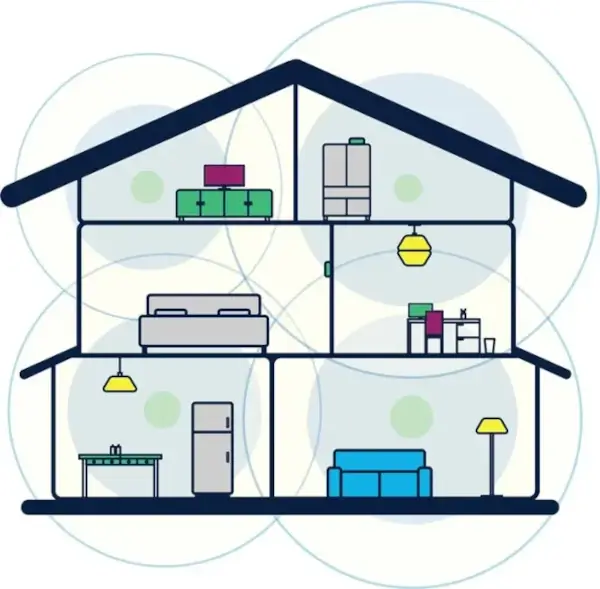
View Kinetic Whole Home Wi-Fi setup
Why Wi-Fi coverage can be different from internet speed
Internet speed is the connection delivered to your home. Wi-Fi coverage is how well that connection reaches your devices wirelessly. These two things are related, but they are not the same.
For example, a home may have a fast fiber internet plan but still experience weak Wi-Fi in a basement, upstairs bedroom, garage, office, or far corner of the house. In that case, upgrading to a faster plan may not fully solve the problem. The better fix may be improved Wi-Fi equipment, better placement, or a whole-home Wi-Fi setup.
Common signs you may need better Wi-Fi coverage
- Some rooms have slower internet than others.
- Video calls freeze or drop in certain parts of the home.
- Streaming works near the router but buffers in other rooms.
- Smart TVs or gaming systems struggle to stay connected.
- Phones switch between Wi-Fi and mobile data inside the house.
- Smart home devices lose connection or respond slowly.
Who should consider Whole Home Wi-Fi?
Whole Home Wi-Fi may be a good fit for larger homes, multi-level homes, households with many devices, or spaces where the router cannot be placed in an ideal central location. It may also help people who work or study from home and need a more dependable connection in a specific room.
It is especially worth reviewing if you already have a fast Kinetic Internet plan but still notice weak signal areas. In that case, the problem may not be the internet plan itself. It may be the way the wireless signal is distributed inside the home.
Kinetic Home Phone

Kinetic Home Phone gives customers a dedicated voice service option. While many people now rely on mobile phones, a home phone can still be useful for families, home offices, older adults, or households that prefer a shared number that stays with the home.
Kinetic describes its home phone service as a digital phone service, also known as VoIP, which uses an internet connection to make and receive calls instead of traditional copper phone lines. Kinetic also states that its Voice plan can be available without an internet plan and includes features such as unlimited nationwide calling, Caller ID, and enhanced voicemail, depending on availability and plan details.
Why some households still keep home phone service
A home phone may still make sense even in a mobile-first world. Some households like having a number that is not tied to one person’s mobile device. Others use home phone service for family calls, medical contacts, home office communication, or convenience.
Home phone service may also be useful for people who prefer a familiar calling setup with features like voicemail, Caller ID, call waiting, call forwarding, and spam-related call tools.
Common Kinetic phone features
- Unlimited nationwide calling: Useful for regular calls within the United States.
- Caller ID: Helps identify incoming callers.
- Enhanced voicemail: Lets callers leave messages when you are unavailable.
- Call forwarding: Sends calls to another number when needed.
- Call waiting: Helps manage another incoming call while already on the phone.
- Spam Call Alert: Helps identify possible unwanted calls.
- Three-way calling: Allows more than two people to join a call.
Important note about digital phone service
Because digital home phone service may depend on network equipment and power, customers should review how the service works during a power outage, internet interruption, or equipment issue. This is especially important for households that rely on home phone service for important calls.
Before ordering, review the current Kinetic phone details for your address and ask about any backup power, emergency calling, or service limitations that may apply.
How These Services Work with Kinetic Internet
Kinetic’s additional services are designed to complement home internet, but each service solves a different problem. Internet Security focuses on safer online activity. Whole Home Wi-Fi focuses on signal coverage and setup. Home Phone focuses on voice calling.
A household may need one of these services, all of them, or none of them. The right choice depends on your home layout, online habits, device count, family needs, and budget.
When to add Internet Security
Consider Kinetic Internet Security if your household has many connected devices, children using the internet, frequent online shopping, or a need for easier network-level security controls. It may also be useful if you want parental controls and protection features managed through one service.
When to add Whole Home Wi-Fi
Consider Whole Home Wi-Fi if your internet speed is strong near the router but weak in other rooms. This service is mainly about coverage, not just speed. It may be especially useful in larger homes, multi-story homes, or homes with signal-blocking walls and layouts.
When to add Home Phone
Consider Kinetic Home Phone if you want a dedicated household number, prefer landline-style calling, need a home office phone option, or want calling features such as Caller ID, voicemail, call forwarding, and spam call tools.
Comparing Kinetic Add-On Services
The table below gives a simple overview of how Kinetic’s other services differ from one another.
| Kinetic Service | Main Purpose | Useful For |
|---|---|---|
| Internet Security | Helps protect home Wi-Fi, connected devices, and online activity | Families, multi-device homes, safer browsing, parental controls |
| Whole Home Wi-Fi | Helps improve Wi-Fi coverage throughout the home | Larger homes, weak signal areas, multi-level layouts, many devices |
| Home Phone | Provides a dedicated home voice calling option | Families, home offices, shared household numbers, landline-style calling |
Should You Add These Services to Kinetic Internet?
Adding services to your internet plan can be convenient, but it should be based on real need. If your Wi-Fi already reaches every room, you may not need Whole Home Wi-Fi. If you already use a complete security suite, password manager, and VPN, you may not need every internet security add-on. If everyone in the home uses mobile phones only, a home phone may not be necessary.
On the other hand, these services can be helpful when they solve a specific problem. A family may value parental controls. A larger home may need better Wi-Fi coverage. A home office may benefit from a dedicated phone line. A household with many devices may want easier network protection.
The best approach is to start with your Kinetic Internet plan, then add only the services that improve your home setup.
Make the Most of Your Kinetic Internet Service
Kinetic’s additional services can help turn a basic internet connection into a more complete home connectivity setup. Internet Security can add protection and management tools, Whole Home Wi-Fi can help improve wireless coverage, and Home Phone can provide a familiar voice service option for households that still need one.
For most customers, the decision comes down to practical needs. If your home has weak Wi-Fi areas, focus on Whole Home Wi-Fi. If online safety and parental controls are a priority, compare Kinetic’s security options. If you still want a dedicated household number, review Kinetic Home Phone availability and features.
You can continue exploring Kinetic services here:
