Cricket BYOD, Activation & Shipping

Switching to Cricket Wireless does not mean you have to buy a new phone. Cricket allows customers to Bring Your Own Device (BYOD), keep an eligible existing phone number, activate with either eSIM or a physical SIM, and order service online.
For many customers, bringing an existing unlocked phone is the least expensive way to switch. The key is making sure the device is compatible with Cricket’s network before you place an order or transfer your number.
This guide covers the complete switching process, including device compatibility, unlocking, IMEI checks, eSIM and physical SIM activation, number transfers, online orders, shipping, delivery, and what to do once your Cricket service arrives.
Bring Your Own Phone to Cricket Wireless
Cricket supports a wide range of compatible unlocked phones through its Bring Your Own Device program.
The basic switching process is straightforward:
- Make sure your phone is unlocked.
- Check the device with Cricket’s IMEI compatibility checker.
- Choose a Cricket wireless plan.
- Decide whether you want to keep your current number or get a new one.
- Activate through eSIM or a physical Cricket SIM card.
Checking compatibility before ordering is important because not every unlocked phone will necessarily work with Cricket, and some compatible devices may support only certain features.
What Does an Unlocked Phone Mean?
A phone is carrier unlocked when it is no longer restricted to the wireless provider that originally sold it.
If your phone is still locked, Cricket cannot unlock it for you. You will normally need to contact the previous carrier and meet that provider’s unlocking requirements.
These requirements may include:
- Paying off the device balance
- Completing a minimum service period
- Having an account in good standing
- Meeting fraud-prevention or ownership requirements
Do not assume that a phone is unlocked simply because it is fully paid off. Verify its status with the original carrier before beginning the Cricket activation process.
Check Your Phone’s IMEI
The most reliable way to determine whether your phone can be used with Cricket is to check its IMEI, or International Mobile Equipment Identity.
Cricket’s compatibility tool uses the 15-digit IMEI to identify the exact device version and determine whether it can be activated on the network.
You can usually find your IMEI by:
- Dialing *#06# on your phone
- Opening the phone’s Settings menu
- Checking the original device packaging
- Looking in the device information section of your existing carrier account
Enter the IMEI into Cricket’s compatibility checker before ordering service.
Tip: Device model names alone are not enough. Different versions of the same smartphone can support different network technologies, so an IMEI check is more reliable than assuming every version of a particular phone will work.
Cricket BYOD Compatibility Requirements
Cricket requires BYOD phones to be compatible with its network and support HD Voice. An unlocked phone that lacks the necessary network support may still be rejected during activation.
Compatible devices can include phones from manufacturers such as:
- Apple
- Samsung
- Motorola
- OnePlus
- Nokia
- Other approved manufacturers
Some phones may work for basic LTE and voice service but may not support every Cricket feature, such as 5G or Wi-Fi Calling. Check the specific device rather than relying only on the brand or model family.
For more information about network support and 5G availability, see our Cricket Coverage & 5G Network guide.
eSIM or Physical SIM?
Cricket supports both eSIM and physical SIM cards on compatible devices.
The best option depends on your phone and how quickly you want to activate service.
Cricket eSIM
An eSIM is a digital SIM built into a compatible smartphone. Instead of inserting a removable card, you download a Cricket service profile directly to the device.
Advantages of eSIM can include:
- Faster activation
- No physical SIM card to lose or damage
- No need to wait for a SIM card to arrive
- Useful support for dual-SIM phones
- Easier switching between eligible mobile services
Cricket states that eligible BYOD customers using eSIM can get connected online quickly, in some cases in less than 15 minutes once the device and order are ready.
Your phone must be:
- Unlocked
- eSIM-capable
- Compatible with the Cricket network
Cricket recommends checking the device IMEI before attempting eSIM activation.
Physical SIM Cards
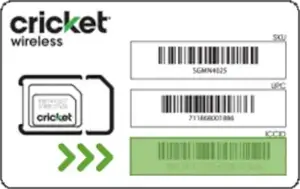
If your phone does not support eSIM, you can activate Cricket with a traditional physical SIM card.
After receiving the SIM, insert it into the compatible phone and complete activation through Cricket’s online activation process.
A physical SIM can also be preferable if you frequently move service between compatible devices or simply prefer a removable card.
► Get Your Cricket Sim or eSim
Can You Keep Your Existing Phone Number?
Yes. Most customers switching from another wireless provider can transfer their existing phone number to Cricket.
Keeping your number can make switching much easier because you do not need to update friends, family, employers, banks, and online accounts with a new phone number.
Before starting the transfer, gather the information from your current carrier.
You will generally need:
- Your current wireless phone number
- Your account number
- A number-transfer or port-out PIN
- The account holder’s name
- Billing ZIP code or other verification details
The exact information required depends on your current carrier.
Do not cancel your existing wireless service before transferring your number. The line normally needs to remain active for the number transfer to complete successfully.
Check Your Number Before Switching
Not every phone number can necessarily be transferred. Cricket provides a number-transfer eligibility process during checkout.
It is a good idea to confirm your current carrier’s transfer requirements before beginning the Cricket order. Incorrect account numbers, transfer PINs, or billing details can delay the process.
If Cricket cannot verify the information, you may need to correct the transfer request before your order can be completed or shipped.
Choose Your Cricket Plan
Once you know your phone is compatible, the next step is selecting your Cricket service plan.
Cricket currently offers:
- Sensible™ 10GB
- Select Unlimited™
- Smart Unlimited™
- Supreme Unlimited
- Eligible multi-month service options
Plans differ in high-speed data, hotspot allowances, international benefits, cloud storage, and other included features.
For a full comparison, visit our Cricket Wireless Plans & Pricing page.
How to Activate Cricket Service
Cricket online orders are generally activated through cricketwireless.com/activate.
The exact process depends on whether you are using a physical SIM or eSIM.
Activating With a Physical SIM
For a phone using a traditional SIM card:
- Receive your Cricket SIM or Cricket phone.
- Insert the correct Cricket SIM card into the phone.
- Locate your order number and Cricket phone number.
- Visit Cricket’s online activation page.
- Follow the prompts and verify your account.
- Restart the phone if required.
- Test calling, texting, and cellular data.
If you ordered multiple lines, make sure the correct SIM card is inserted into the correct phone before activating the account.
Activating With eSIM
For an eSIM-compatible phone, there is no physical card to insert.
The general process is:
- Complete your Cricket order.
- Visit Cricket’s activation page.
- Verify your account and device.
- Download or install the Cricket eSIM profile when prompted.
- Follow the phone’s on-screen setup instructions.
- Restart the device if necessary.
- Test your service.
Depending on the device, Cricket may send a notification prompting you to install the eSIM profile.
Activating Multiple Cricket Lines
If you order several Cricket phone lines at the same time, Cricket generally activates the entire new account together.
For physical SIM orders, make sure each SIM is matched with the correct device before beginning activation.
If your order includes both a phone and a compatible smartwatch, activate the phone first and then complete smartwatch setup.
Customers adding a new line to an existing Cricket account must activate that line before placing another new-line order.
Phones or SIM Cards Purchased Somewhere Else
Cricket SIM cards and compatible devices can also be purchased from retailers outside Cricket’s own website.
If you purchase a SIM or phone from retailers such as Walmart, Target, Amazon, or another authorized seller, the activation process may differ from Cricket’s standard online-order activation flow.
Follow the activation instructions provided for non-Cricket retail purchases and confirm that the device and SIM are appropriate for your intended Cricket plan.
BYOD Data & Messaging Settings
Some Bring Your Own Device phones may need updated network settings after activation so that cellular data and multimedia messaging work correctly.
Cricket provides setup information for supported operating systems and devices.
If calls and standard texts work but cellular internet or picture messaging does not, check:
- Mobile data settings
- APN configuration
- MMS settings
- Software updates
- Network mode
- Whether the device has been restarted after activation
Many modern phones configure these settings automatically, but some Android devices may require manual changes.
Ordering Cricket Service Online
Cricket allows customers to order phones, SIM cards, service plans, and accessories through its website.
Before completing checkout, review:
- Device compatibility
- Selected wireless plan
- Phone number transfer details
- SIM or eSIM selection
- Device price
- Promotional requirements
- Shipping address
- Billing information
Incorrect information can delay an order, especially when a number transfer requires additional verification.
Cricket Shipping & Delivery
Cricket currently provides free 2-business-day shipping on online orders.
That does not necessarily mean an order placed today will arrive exactly two business days later. Processing and verification can affect when the package actually ships.
When Cricket Orders Ship
Cricket currently states that:
- Orders received before 2 p.m. Eastern Time Monday through Friday generally ship the next business day.
- Orders placed after 2 p.m., on weekends, or on holidays generally begin processing the next business day.
- Orders involving a phone number transfer can take longer than the standard shipping timeframe.
The 2-business-day shipping estimate applies after the order has been processed and shipped.
Track Your Cricket Order
Once an order ships, Cricket sends a shipment confirmation email containing a tracking number.
You can also track an order using your:
- Cricket order number
- Shipping ZIP code
- Carrier tracking number
Cricket currently uses UPS for many package deliveries.
Billing & Shipping Address Requirements
Cricket applies strict address-verification rules to online orders for security purposes.
The billing address you enter should match the address associated with your debit or credit card, and Cricket currently requires the shipping address to match that verified billing address during checkout.
Even small address differences can sometimes interfere with verification. For example, the bank may have an address listed as “Street” while a customer enters only “St.”
Use the address exactly as it appears on your card issuer’s records when possible.
Can You Change the Delivery Location?
Cricket allows some customers to change the final package delivery location after an order has been placed, depending on the carrier’s delivery options.
However, this is different from entering an unrelated shipping address during Cricket checkout. The original order still needs to pass Cricket’s billing and address verification.
For valuable smartphone orders, monitor the tracking information and delivery requirements so the package is not left unattended.
What Can Delay a Cricket Order?
Most orders are straightforward, but several issues can slow down processing or activation.
Common causes include:
- Incorrect billing address
- Payment verification problems
- Incorrect number-transfer information
- Invalid port-out PIN
- Phone number not eligible for transfer
- Device compatibility problems
- Holiday or weekend processing
- High-demand device availability
If you are transferring a number, double-check the account information from your current carrier before submitting the order.
What to Do When Your Cricket Order Arrives
Once your Cricket phone or SIM arrives, avoid cancelling your previous wireless account until the transfer and activation process is successfully completed.
A useful setup checklist is:
- Confirm that you received the correct device and SIM.
- Back up your old phone if you purchased a new device.
- Insert the Cricket SIM if applicable.
- Complete activation online.
- Install an eSIM profile if required.
- Transfer contacts, photos, and apps.
- Test incoming and outgoing calls.
- Send and receive text messages.
- Turn Wi-Fi off temporarily and test cellular data.
- Check voicemail.
- Test Wi-Fi Calling if you intend to use it.
Only after the number transfer and Cricket service are fully working should you confirm that any old service no longer needed has been closed.
Set Up Your Cricket Account
After activation, create or register your Cricket account online or through the myCricket app.
Your account can be used to:
- Pay your bill
- Manage Auto Pay
- Review plan information
- Monitor usage
- Add or remove eligible features
- Manage multiple lines
- Update account information
Cricket can send a temporary passcode to your phone during the account-registration process.
Moving From a Physical SIM to eSIM
Existing customers with a compatible phone may also be able to switch from a physical Cricket SIM to eSIM.
This can be useful when:
- Upgrading to an eSIM-only device
- Using a dual-SIM phone
- Replacing a damaged physical SIM
- Moving Cricket service to another compatible device
Always verify compatibility before attempting the change. Removing or disabling the old SIM before the new eSIM is successfully installed can temporarily interrupt service.
Switching Devices on an Existing Cricket Line
If you are already a Cricket customer and purchase another compatible phone, you may be able to move your existing service to the new device.
Depending on the devices involved, this may require:
- Moving your physical SIM
- Activating a replacement SIM
- Transferring or installing an eSIM
- Updating device settings
Before switching devices, back up important data and confirm that the replacement phone passes Cricket’s compatibility requirements.
BYOD vs. Buying a Cricket Phone
Bringing your own device is not always the best choice. Cricket frequently offers discounted phones to new customers, including switcher deals that can reduce selected devices to very low prices or $0.
BYOD may be better if:
- Your current phone is relatively new
- The phone is paid off
- It is already unlocked
- It passes Cricket’s compatibility check
- You want to minimize the cost of switching
Buying a Cricket phone may be better if:
- Your current phone is old or damaged
- Your device is incompatible
- You qualify for a strong switcher promotion
- You want guaranteed Cricket compatibility
- You were already planning to upgrade
See our Cricket Phones, Devices & Deals guide for more information about current device options.
Before You Switch to Cricket
A little preparation can make the transition considerably easier.
Before submitting your order:
- Check Cricket coverage where you use your phone most
- Verify that your phone is unlocked
- Run the device through the IMEI checker
- Confirm whether you will use eSIM or physical SIM
- Gather your current carrier’s account and transfer information
- Do not cancel your existing line
- Choose the Cricket plan that fits your data and hotspot needs
- Make sure billing and shipping information is accurate
- Back up your phone before changing devices
Taking these steps can help prevent one of the most common switching problems: discovering a compatibility, number-transfer, or account-verification issue after the order has already been submitted.
Is Bringing Your Own Phone to Cricket Worth It?
For customers who already own a compatible unlocked smartphone, Cricket BYOD can be one of the simplest and least expensive ways to switch wireless providers.
You avoid purchasing another phone, can usually keep your existing number, and may be able to activate quickly with eSIM on a supported device.
The most important steps are to verify your phone’s IMEI, make sure it is carrier unlocked, and confirm Cricket coverage before transferring your number.
If your phone is not compatible or you are due for an upgrade anyway, compare Cricket’s current smartphone promotions before deciding to bring your existing device.
Once you are ready to switch, compare service options on our Cricket Wireless Plans & Pricing page, or learn more about available phones on our Cricket Phones, Devices & Deals page.
Switch to Cricket Wireless
Bring a compatible unlocked phone, keep your number, activate with eSIM or a physical SIM, and get free 2-business-day shipping on eligible online orders.
👉 Bring Your Phone to Cricket | Activate Cricket Service
Device compatibility, eSIM eligibility, number-transfer requirements, shipping times, activation procedures, and promotional offers are subject to change. Shipping estimates begin after order processing and may be affected by number-transfer verification, weekends, holidays, payment verification, or device availability. Check Cricket’s current requirements before ordering or activating service.