Cricket Coverage & 5G Network

Cricket Wireless provides nationwide wireless service on the AT&T network, including access to 5G where available and 4G LTE in other areas. For customers considering Cricket, coverage should be one of the first things to check because actual service quality can vary by location, device, building conditions, terrain, and network congestion.
Cricket offers an online coverage map where you can enter an address or ZIP code to see estimated wireless voice and data availability in your area. The map is useful as a starting point, but Cricket notes that it is only an approximation and does not guarantee the exact performance you will experience at a particular address.
This guide explains Cricket’s 5G and LTE coverage, how to check availability, what devices are compatible, and what to consider before switching.
Does Cricket Wireless Have 5G?
Yes. Cricket offers nationwide 5G access on the AT&T network with compatible devices and eligible service.
There is no separate premium “5G plan” required simply to connect to the network. If your phone supports Cricket’s 5G service and you are in an area where 5G coverage is available, the device can connect automatically.
When 5G is not available, compatible phones can continue using 4G LTE. This means customers do not lose service simply because they move outside a 5G coverage area.
Actual performance depends on several factors, including:
- Your location
- Distance from nearby network sites
- Your phone model and supported frequencies
- Building materials and indoor conditions
- Terrain and vegetation
- Weather
- Network congestion
- Your Cricket plan and network-management rules
Cricket Uses the AT&T Network
Cricket is owned by AT&T and provides service on the AT&T wireless network. This gives Cricket customers access to a large nationwide 5G and LTE footprint without requiring a traditional AT&T postpaid account.
Using the same underlying network does not necessarily mean every Cricket customer will experience the exact same performance as every AT&T postpaid customer. Plan terms, device compatibility, network management, and congestion can affect speeds and service priority.
Still, the underlying network relationship is an important advantage for Cricket because it gives the provider broad national coverage rather than relying on a smaller regional network.
How to Check Cricket Coverage
Before switching, use Cricket’s coverage map to check the locations where you use your phone most frequently.
Do not limit the check to your home address. It is also useful to look at:
- Your workplace
- Your school or college
- Your daily commute
- Frequently visited shopping areas
- Family members’ homes
- Regular travel destinations
- Rural roads or vacation areas you visit often
Cricket’s coverage map provides an approximation of wireless voice and data service. Cricket specifically notes that real-world coverage can differ because of terrain, weather, foliage, buildings, signal strength, high-usage periods, customer equipment, and other factors.
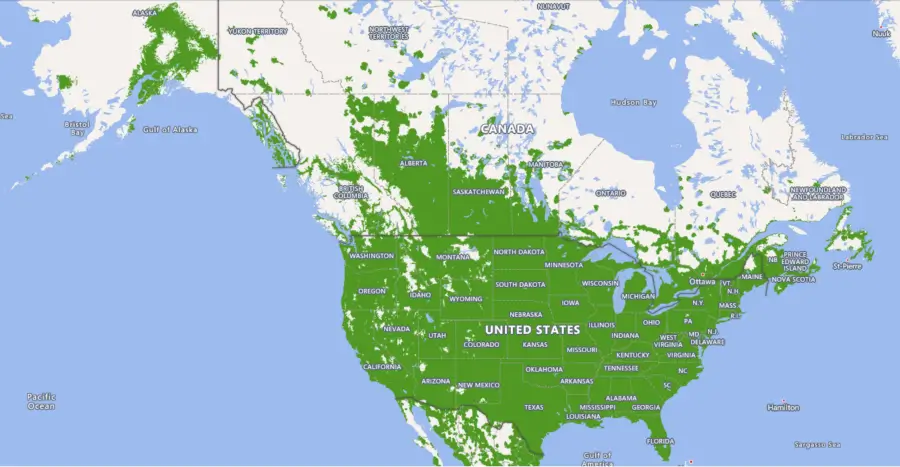
Tip: If coverage at one particular location is especially important, such as your home or workplace, checking an address is more useful than relying only on a broad ZIP-code view.
► Check Cricket Coverage in Your Area
Why Actual Coverage Can Differ From the Map
Wireless coverage maps are useful planning tools, but they cannot account for every building, hill, tree, or temporary network condition.
You may see strong coverage shown for a neighborhood while experiencing a weaker signal inside a particular building. Common causes include:
- Concrete or metal walls
- Energy-efficient windows
- Basements
- Large office buildings
- Parking garages
- Dense trees and foliage
- Hills or mountainous terrain
- Being far from a network site
Signal quality can also change throughout the day as more people connect to the same network resources.
For this reason, Cricket states that its map should be treated as a high-level approximation rather than a guarantee of service or speed.
Cricket 5G vs. 4G LTE
Cricket customers may move between 5G and 4G LTE throughout the day depending on where they are and what their phone supports.
5G can provide faster speeds, additional network capacity, and improved performance in areas where the network has been upgraded. LTE remains an important part of Cricket’s service and is still capable of supporting most common smartphone activities.
Typical activities that can work well on either a good LTE or 5G connection include:
- Web browsing
- Social media
- Navigation
- Music streaming
- Video calls
- Messaging
- Video streaming
A 5G phone is not strictly necessary to use Cricket, provided the device is otherwise compatible. However, customers buying a new phone may benefit from choosing a 5G-capable model so they can take advantage of current and future network improvements.
What Phones Work With Cricket?
Cricket supports a wide variety of smartphones, including devices sold directly by Cricket and many unlocked phones brought from other providers.
For a Bring Your Own Device phone to work properly, Cricket says it must be HD Voice capable and compatible with Cricket’s HD Voice network. The device also needs to be unlocked from its previous carrier.
The most reliable way to verify compatibility is to use Cricket’s IMEI compatibility checker before ordering service.
Cricket supports compatible models from manufacturers such as:
- Apple
- Samsung
- Motorola
- OnePlus
- Sony
- Nokia
- And others
Compatibility can vary even between different versions of the same phone model, so do not assume that a device will work simply because another version of that model is supported.
How to Find Your Phone’s IMEI
Your phone’s IMEI is a unique device identifier that Cricket can use to check network compatibility.
You can usually find it by:
- Dialing *#06# on the phone
- Opening the device’s Settings menu
- Checking the original packaging
- Looking at the SIM or device information section
Running the IMEI check before transferring your number is one of the simplest ways to avoid activation problems.
Cricket 5G-Compatible Phones
Not every phone that supports 5G in general will necessarily access Cricket’s 5G service. The device must support the network technologies and configurations Cricket uses.
Cricket maintains a list of tested compatible devices and recommends using its IMEI checker for the most accurate result.
Examples of commonly supported 5G device families include:
- Recent Apple iPhone models
- Samsung Galaxy S and A series phones
- Motorola Moto G and Razr models
- Google Pixel models
- Selected Cricket-branded 5G phones
Cricket also warns that some devices originally sold by other wireless providers may not have access to Cricket’s 5G service even if they otherwise work on the network.
Bring Your Own Phone to Cricket
Cricket allows customers to Bring Your Own Phone, which can reduce the cost of switching if you already own a suitable device.
Before bringing a phone to Cricket, make sure it is:
- Unlocked from the previous carrier
- Compatible with Cricket’s HD Voice network
- Approved through Cricket’s IMEI compatibility checker
- Compatible with the Cricket plan you intend to use
Some devices may support only certain features. For example, one phone may work for HD Voice and LTE but not support Wi-Fi Calling or 5G on Cricket.
For that reason, compatibility should be checked at the device level rather than relying only on the manufacturer or model name.
► Check Cricket Coverage in Your Area
eSIM and Physical SIM Support
Cricket supports both eSIM and physical SIM activation on compatible devices.
eSIM allows eligible customers to activate service digitally without inserting a traditional SIM card. This can make switching faster and is useful for phones that support multiple active lines.
Physical SIM cards remain available for compatible devices that do not support eSIM or for customers who prefer a traditional SIM.
Device eligibility should still be verified before activation, even if the phone supports eSIM.
Wi-Fi Calling
Cricket supports Wi-Fi Calling on compatible devices. This feature can help in homes, offices, and other locations where cellular reception is weak but a stable Wi-Fi connection is available.
Instead of relying entirely on a nearby cell tower, compatible calls and messages can be routed over the Wi-Fi network.
Wi-Fi Calling can be especially helpful in:
- Basements
- Large office buildings
- Homes with thick exterior walls
- Rural properties with weak indoor reception
- Locations where outdoor coverage is stronger than indoor coverage
Availability depends on both the phone and Cricket’s compatibility requirements.
Can You Try Cricket Before Switching?
Cricket offers a program called tryCricket that allows eligible customers to test the Cricket network before fully switching service.
The current trial runs for 14 days and is designed to let you experience Cricket coverage without interrupting your existing wireless service.
This can be particularly useful if you are unsure about:
- Indoor reception at home
- Coverage at work
- Signal quality along your commute
- 5G availability in your area
- Performance in places you visit regularly
Testing the network yourself can provide a more realistic picture than relying entirely on a coverage map.
Cricket Coverage in Mexico and Canada
Some Cricket plans include service while traveling in Mexico and Canada, but this benefit is not included with every plan.
Current Smart Unlimited and Supreme Unlimited plans include eligible talk, text, and data use in Mexico and Canada. Lower-tier plans have more limited international benefits.
Cricket also applies usage restrictions in Canada. Current terms state that usage in Canada cannot exceed 50% of your total voice, text, or data usage during any consecutive three-month period.
If you travel frequently between the U.S., Canada, and Mexico, compare the international benefits of each plan before selecting service.
For more details, see our Cricket Features, Hotspot & International page.
Coverage and Network Congestion
Having strong signal coverage does not always mean you will receive the same speed at all times.
Wireless networks have a limited amount of local capacity. During busy periods, many customers may be sharing the same network resources.
Cricket’s lower unlimited plans allow the provider to temporarily reduce data speeds when the network is congested. The specific network-management rules depend on the plan.
This means two Cricket customers standing in the same place could potentially experience different performance depending on their plans, devices, and current network conditions.
For details about how the current plans differ, visit our Cricket Wireless Plans & Pricing guide.
Rural Cricket Coverage
Cricket’s use of the AT&T network gives it a broad footprint across the United States, including many rural and suburban areas. However, rural coverage can still vary considerably from one location to another.
In less populated areas, check:
- Your exact home address
- Nearby highways
- Local towns
- Worksites
- Frequently traveled rural roads
Terrain can have a particularly strong effect in rural areas. Hills, mountains, forests, and long distances between network sites can all affect signal quality.
Coverage Tips Before Switching to Cricket
Before transferring your number or purchasing a new phone, take a few minutes to confirm that Cricket fits your location and device.
- Check coverage at your home
- Check your workplace and commute
- Check other locations you visit frequently
- Use the tryCricket trial if available to you
- Confirm that your existing phone is unlocked
- Run the phone through Cricket’s IMEI compatibility checker
- Verify 5G support if 5G access is important
- Check Wi-Fi Calling support if you have weak indoor cellular coverage
- Review Mexico and Canada benefits if you travel internationally
These checks can help prevent problems after you have already transferred your number or paid for service.
Is Cricket Coverage Right for You?
Cricket can be a strong option for customers who want prepaid wireless service with nationwide access to the AT&T network. Its combination of 5G and LTE coverage, Bring Your Own Phone support, Wi-Fi Calling, eSIM activation, and an optional 14-day network trial makes it relatively easy to determine whether the service fits your needs.
The most important consideration is not whether Cricket advertises nationwide coverage, but whether the network performs well in the specific places where you use your phone.
Start by checking your home, workplace, commute, and other important locations. Then verify that your device is compatible before switching.
Once you know the coverage works for you, compare the available options on our Cricket Wireless Plans & Pricing page.
Cricket Wireless Coverage
Check Cricket 5G and LTE coverage on the AT&T network, confirm your phone is compatible, and test service in the places where you use your phone most.
Check Cricket Coverage | Compare Cricket Plans
Cricket coverage maps are estimates and do not guarantee service or performance at a particular location. Actual coverage and speeds vary based on terrain, buildings, weather, network congestion, device compatibility, signal strength, and other factors. 5G requires a compatible device and is not available everywhere. Check Cricket’s current coverage and compatibility information before activating service.
► Check Cricket Coverage in Your Area